
Introduction
Install AI Chat Snapper
Add AI Chat Snapper to Chrome, Edge, Brave, or another Chromium browser in a few clicks.
AI Chat Snapper installs like any other browser extension. It takes less than a minute.
Install from the Chrome Web Store
- Open the AI Chat Snapper listing on the Chrome Web Store.
- Click Add to Chrome, then confirm in the dialog.
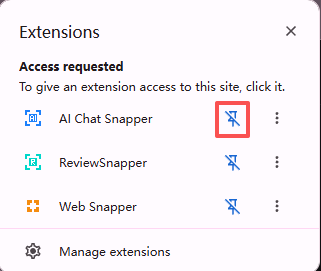
- Pin the extension so its icon stays visible in your toolbar - click the puzzle-piece icon, then the pin next to AI Chat Snapper.
Supported browsers
AI Chat Snapper works in Chrome and other Chromium-based browsers, including:
- Google Chrome
- Microsoft Edge
- Brave
- Arc
- Opera
- And other compatible browsers.
Permissions
The extension only reads the AI conversation on the page when you click it to export. Local exports are generated in your browser - see Local Storage for how your data is handled.
Next step
Ready to use it? Continue to Export your first conversation.