
Export formats
Export AI Chats to Markdown
Save AI chats as Markdown for Obsidian and Notion — export conversations to your knowledge base.
Markdown is plain text with light formatting. It's the best format for notes apps, knowledge bases, and version control, because it stays readable, searchable, and easy to edit anywhere.
Export a conversation to Markdown
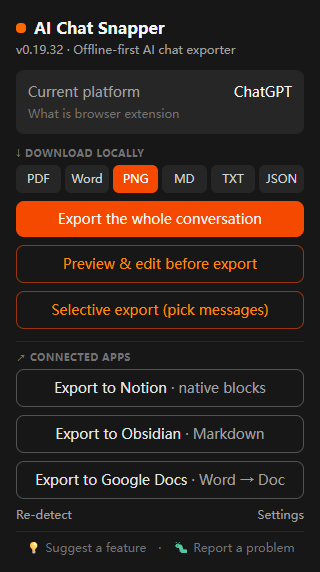
- Open the conversation in any supported assistant.
- Click the AI Chat Snapper icon.
- Choose Markdown.
- Save the
.mdfile, or send it to a destination. ( local, Obsidian or Notion)
What the Markdown includes
Headings stay as # headings, lists stay as lists, and code blocks stay fenced with triple backticks - so they render correctly in any Markdown editor. Because it's plain text, it stays useful for years and works with tools you already own.
Great for notes apps
Markdown is the natural format for Obsidian, Notion, and similar tools: export the chat, drop it into your vault or workspace, and link it to the project it belongs to. AI Chat Snapper can send Markdown straight to Obsidian or Notion, or save a .md file locally for you to add wherever you like — see Cloud Storage.
Related
- Need a polished document instead? See Export to PDF.
- For raw text or data, see Export to TXT & JSON.