
Annotate & redact
Annotate Pages
Highlight, note, and draw on any page with Web Snapper's on-page editor — annotations bake into every PNG, PDF, HTML, and Markdown export.
Sometimes a capture isn't enough — you need to point out the part that matters. Web Snapper's on-page editor lets you mark up a page before you save it, so the version you share already says what you mean. Everything you add is captured along with the page.
Mark up the page
Open the on-page editor on the page you want to capture, then use the tools that fit what you're documenting:
- Open the page you want to capture.
- Start Web Snapper and switch to the on-page editor.
- Pick a tool and mark up the page.
- Capture or export when you're done.
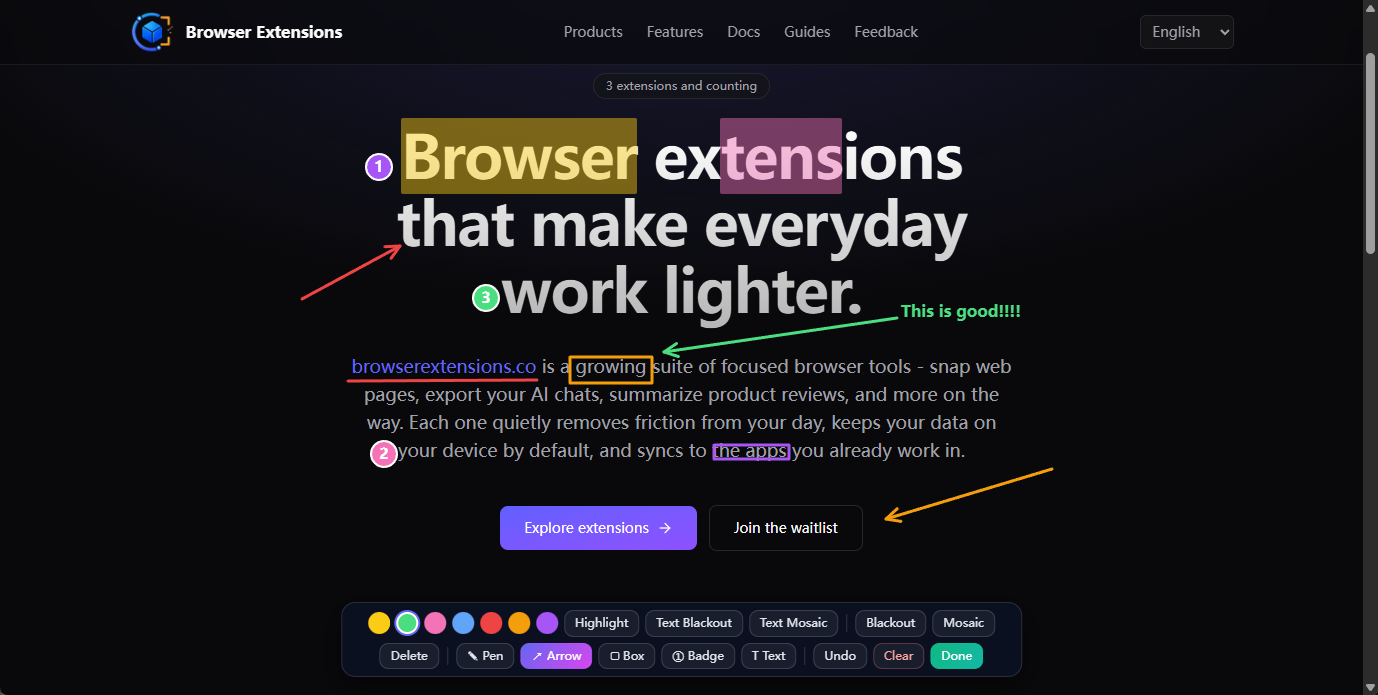
What you can add
The editor covers the markup you'd normally reach for:
- Highlights — emphasize text in multiple colors, the way you would with a real highlighter.
- Notes and tags — attach a short comment or label to anything on the page.
- Drawing tools — draw freehand with the pen, point with arrows, frame an area with boxes, and drop numbered badges to walk through a sequence step by step.
Mix and match as needed: highlight the key sentence, box the screenshot beside it, and number the steps a reader should follow.
Annotations travel with every export
Whatever you add on the page is baked into every export — there's no separate "with markup" step to remember. Your highlights, notes, and drawings show up the same way whether you save the page as a:
- Full-page screenshot (PNG)
- Searchable PDF
- Single-file HTML snapshot
- Clean Markdown file
Highlights get special treatment in PDF: instead of being flattened into the image, they export as real, editable PDF annotations. Anyone who opens the file in a standard PDF reader can see, adjust, or remove them — and the underlying text stays selectable and searchable.
Related
- Need to hide private details instead of calling them out? See Redact Sensitive Content.
- Learn what else Web Snapper can do on the product page.
- Everything runs locally — see the privacy policy.