
Organize & settings
Local History Archive
Web Snapper auto-saves every capture to a searchable local history with thumbnails — find, reopen, locate, or delete any past capture, 100% on-device.
Every time you capture a page, Web Snapper quietly saves it to a local history archive on your device. There's nothing to turn on and nothing to remember — your captures are always there when you need to look something up later.
What gets saved
Each capture is indexed automatically with:
- A thumbnail so you can recognize it at a glance.
- The source page it came from.
- Searchable text, so you can find a capture by what's actually on it — not just its title.
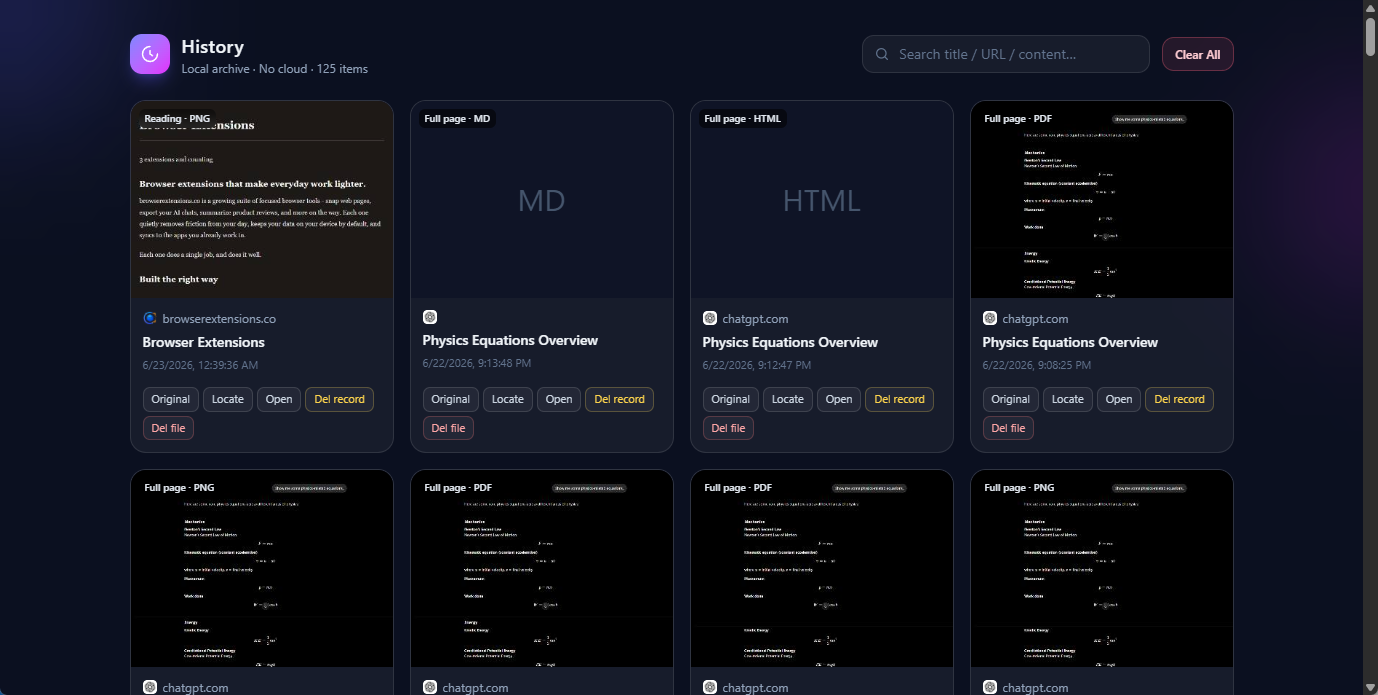
Find any past capture
Open the History page and use the search box to find what you're looking for. Because the archive is fully indexed, full-text search matches the content inside your captures, so you can locate something even if you don't remember exactly when you saved it.
From any entry in the list you can:
- Reopen the original page the capture came from.
- Locate the saved file on disk.
- Delete the capture when you no longer need it.
Stored locally, zero cloud
The history archive lives entirely in your browser, in IndexedDB on your device. Nothing is uploaded, no account is required, and your captures never leave your computer — the same privacy promise as the rest of Web Snapper. See the privacy policy for details.
This is also why Web Snapper keeps its index even when your browser is low on storage: the archive is held in unlimited local storage so it isn't quietly evicted.
Clearing your history
You're always in control of what's kept. You can delete individual captures from the History page, or clear the whole archive whenever you like. Once cleared, the entries and their thumbnails are gone from your device.